How to Find the Original Source of a Quote: A Researcher's Reverse-Search Guide
You have a quote in your notes but lost the source. Here's how to trace any academic quote back to its original publication using reverse citation search, CrossRef, and AI-powered source finding.
You're finalizing your manuscript and you find it: a perfect quote in your notes that supports your central argument. "Organizational resilience is not the absence of disruption but the capacity to adapt resource allocation in real time." It's exactly what you need.
There's one problem. You have no idea where it came from.
No author name. No journal. No year. Just the quote, sitting in a Notion page from six months ago when you were reading thirty papers a week and not keeping careful track.
This happens to every researcher eventually. The good news is that in 2026, there are reliable methods for tracing a quote back to its source — even when you have nothing but the text itself.
Method 1: Exact Phrase Search in Google Scholar
Start with the simplest approach. Put the exact quote in double quotation marks and search Google Scholar:
"capacity to adapt resource allocation in real time"
If the phrase appears verbatim in a published paper, Google Scholar will find it. This works best for distinctive phrases — specific technical terms, unusual word combinations, or sentences with specific numbers or data.
When it works: The quote is distinctive, published in an indexed journal, and hasn't been paraphrased from the original.
When it fails: The quote is a paraphrase (your notes reworded it slightly), the paper isn't indexed in Google Scholar, or the phrase is too generic (like "further research is needed").
Method 2: Semantic Search with Semantic Scholar or OpenAlex
If an exact phrase search fails, the quote might be a paraphrase — close to the original but not word-for-word. Semantic search tools match on meaning rather than exact text.
Search Semantic Scholar or OpenAlex with the key concepts from your quote. For the resilience example, try: "organizational resilience adaptive resource allocation."
This approach returns papers that discuss the same concepts, even if the exact wording differs. You'll need to skim the results to find the specific paper your notes drew from.
Method 3: AI-Powered Source Finding
Paste the quote directly into Citely's Source Finder. The tool searches across CrossRef, PubMed, OpenAlex, arXiv, and Google Scholar simultaneously, looking for publications that match the content of your text.
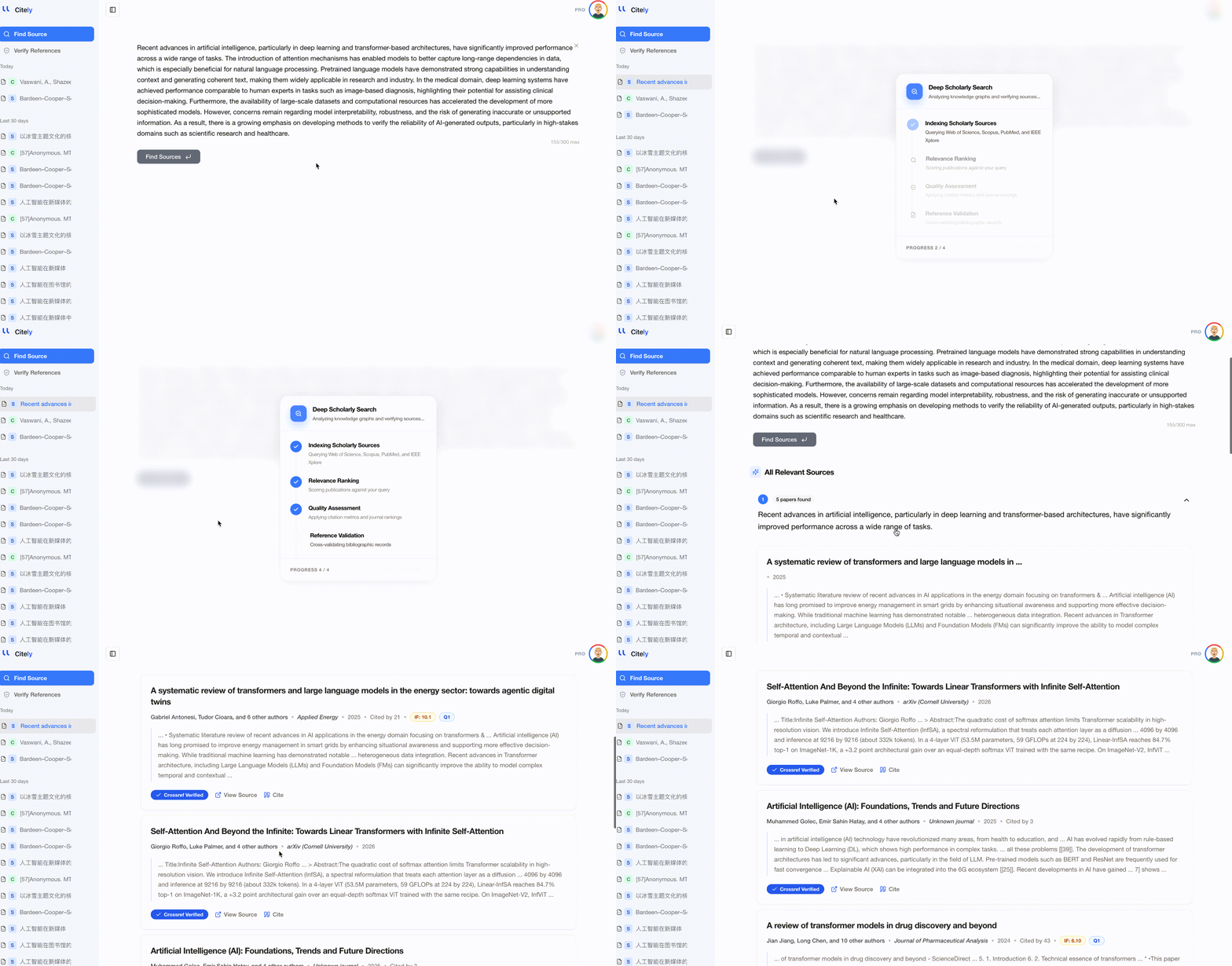
This approach is faster than manual searching because it queries multiple databases at once and ranks results by relevance. It's particularly useful when:
- You have a paraphrased version of the original quote
- The quote comes from a field outside your primary expertise (so you don't know which database to search)
- You have several orphaned quotes to trace and need batch processing
Method 4: CrossRef Metadata Search
If you have any metadata at all — a partial author name, an approximate year, a journal name — CrossRef's search API can narrow down candidates quickly.
Go to CrossRef search and enter what you know. Even fragmentary information helps:
- Author surname + approximate year + one keyword → usually narrows to under 20 results
- Journal name + year + keyword → often narrows to under 10 results
Method 5: Citation Chain Tracing
If you remember roughly which paper led you to the quote, but not the quote's source itself, check the reference lists of papers you read during that period.
Your citation manager's history can help. If you were reading papers on organizational resilience in October, export that month's additions from Zotero and check their reference lists for papers matching the quote's content.
This is labor-intensive but works when technical search methods fail, because it retraces your actual reading path.
How to Prevent Orphaned Quotes
The best solution is to never lose the source in the first place. These habits reduce orphaned quotes significantly:
At the moment of reading
When you copy a quote or make a note, always include: author last name, year, and DOI. This takes 10 seconds and saves hours later. The minimum viable citation is "(Smith, 2023, DOI: 10.xxxx/yyyy)" — enough to find the paper again.
In your note-taking system
Use a template that forces source attribution. Whether you use Notion, Obsidian, or a plain text file, every note should have a mandatory "Source" field. Don't let yourself save a note without filling it in.
At the end of each reading session
Spend 5 minutes reviewing your new notes. Flag any that are missing sources while the memory is fresh. Looking up a source 30 minutes after reading it is much faster than looking it up 6 months later.
Before starting to write
Run through your notes for the relevant section. Any note without a source gets flagged. Resolve these gaps before you start drafting — not after the manuscript is written, when the pressure of a deadline makes you tempted to skip verification.
What to Do When You Can't Find the Source
After exhausting all search methods, you have three options:
-
Paraphrase and cite a similar source. If you can find a published paper that makes the same point, cite that paper instead. Make sure to paraphrase rather than quote, since it's a different source.
-
Remove the quote. If the claim is important but you can't source it, state it in your own words without a citation. This is honest — you're representing it as your interpretation, not as someone else's finding.
-
Don't fabricate a source. This should be obvious, but the temptation to "fill in" a plausible citation for a quote you can't source is real. An unsourced claim is always better than a fabricated citation.
Key Takeaways
- Orphaned quotes — notes without source attribution — affect every researcher who reads widely and takes notes across multiple sessions and tools
- Start with an exact phrase search in Google Scholar for distinctive quotes; move to semantic search when the quote might be a paraphrase
- AI-powered source finders query multiple databases simultaneously and can match content to publications even from paraphrased text
- The most effective prevention is a 10-second habit: always note the author, year, and DOI when you copy any text from a paper
- When a source can't be found after thorough searching, paraphrase using a verifiable alternative or remove the quote entirely — never fabricate a citation to fill the gap
Find your lost source → citely.ai/source-finder