Source Finder Tools Explained: How They Work and Which to Use (2026)
Source finder tools search academic databases to locate published papers matching your topic or text. Learn how they differ from Google Scholar, what databases they query, and which tool fits your research workflow.
A source finder is a tool that helps you locate published academic papers relevant to your research topic. Unlike a general search engine, a source finder queries scholarly databases — CrossRef, PubMed, arXiv, OpenAlex, Google Scholar — and returns results that are verified, peer-reviewed publications with proper metadata. In 2026, source finders have become essential because the volume of published research has grown beyond what any manual search strategy can cover: CrossRef alone indexes over 150 million scholarly records, and that number grows by several million each year.
What Exactly Does a Source Finder Do?
At its core, a source finder takes your input — a topic, a research question, a block of text, or even a partial citation — and searches across multiple academic databases simultaneously. It returns a list of relevant published papers, complete with:
- Title and author names
- Journal and publication year
- DOI (Digital Object Identifier) for permanent access
- Abstract or summary when available
The key difference from Googling your topic is database coverage and result quality. A Google search returns blog posts, news articles, Wikipedia entries, and academic papers mixed together. A source finder returns only verified scholarly works from academic databases.
How source finders differ from citation managers
This is a common point of confusion. Citation managers (Zotero, Mendeley, EndNote) help you organize and format references you've already found. Source finders help you discover references in the first place. They solve different problems and work best when used together: find sources first, then manage them.
Types of Source Finder Tools
1. Database-specific search engines
These search a single database:
- PubMed — biomedical and life sciences literature
- arXiv — preprints in physics, mathematics, computer science
- SSRN — social sciences and humanities working papers
- IEEE Xplore — engineering and technology
Strengths: Deep coverage within their domain. Advanced filters (MeSH terms in PubMed, subject classifications in arXiv). Limitations: You need to know which database to search. Miss papers outside their scope.
2. Multi-database academic search engines
These search across multiple sources:
- Google Scholar — the broadest, indexes most published research plus preprints, theses, and court opinions
- Semantic Scholar — AI-powered, provides citation context and influence scores
- OpenAlex — open-source alternative with full API access to 250M+ works
Strengths: Wide coverage. Good for exploratory searches when you don't know which database has what you need. Limitations: Can return overwhelming numbers of results. Quality varies — Google Scholar indexes predatory journals alongside Nature.
3. AI-powered source finders
The newest category. These use language models and academic databases together:
- Citely Source Finder — takes your topic or text, searches CrossRef and academic databases, returns verified papers with DOIs
- Consensus — answers research questions with claims extracted from papers
- Elicit — uses AI to find and summarize relevant papers
Strengths: Understand natural language queries ("what causes antibiotic resistance in hospital settings"). Can find relevant papers you wouldn't have found with keyword searches alone. Limitations: Newer tools with smaller user bases. Important to verify the results are real — which is why Citely pairs its source finder with a Citation Checker.
Comparison Table
| Feature | Database Search (PubMed) | Google Scholar | Citely Source Finder |
|---|---|---|---|
| Accepts natural language queries | No (keyword-based) | Partial | Yes |
| Searches multiple databases | No (single database) | Yes (broad) | Yes (CrossRef + others) |
| Returns only verified papers | Yes | No (includes preprints, theses) | Yes |
| Provides DOI for every result | Yes | Sometimes | Yes |
| Free to use | Yes | Yes | Yes (free tier) |
| Filters by field/date/journal | Advanced | Basic | Basic |
| Works from a block of text | No | Partial (quoted phrases) | Yes |
How to Get the Most Out of a Source Finder
Start broad, then narrow
Begin with a general topic query to understand the landscape. Then refine with specific terms, date ranges, or author names. Jumping straight to narrow queries risks missing important papers that use different terminology.
Use text-based search for precision
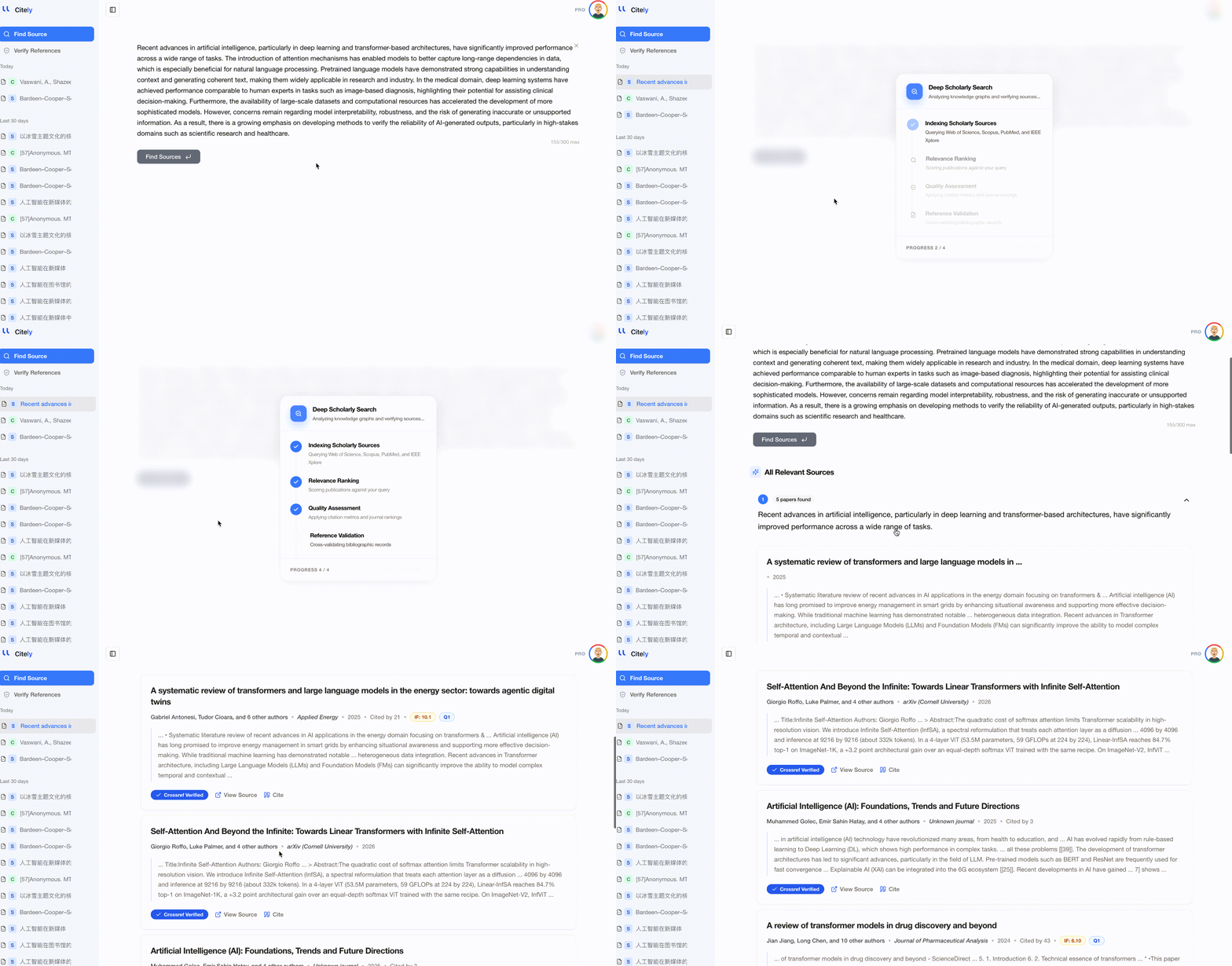
If you have a paragraph describing your research question, paste the whole thing into an AI-powered source finder like Citely. The tool can extract key concepts and find papers that address your specific angle, not just keyword matches.
Don't rely on a single tool
No source finder covers everything. A paper indexed in PubMed might not appear in arXiv. A conference paper in IEEE Xplore might not show up in CrossRef. For thorough literature coverage, use at least two different tools.
Verify what you find
This applies especially to AI-powered tools: always check that the papers returned actually exist. Copy the DOI and resolve it at doi.org. Or run your collected references through Citely's Citation Checker to batch-verify everything at once.
When to Use a Source Finder vs. When to Use Google Scholar
Google Scholar is the default for most researchers, and for good reason — it has the broadest coverage of any academic search engine. But there are specific situations where a dedicated source finder works better:
| Situation | Best tool |
|---|---|
| Exploratory search on a new topic | Google Scholar |
| Need papers from a specific database (e.g., PubMed for medical research) | Database-specific search |
| Have a block of text and need matching sources | AI source finder (Citely) |
| Need verified, DOI-confirmed papers only | AI source finder (Citely) |
| Looking for the most-cited papers on a topic | Google Scholar or Semantic Scholar |
| Building a reference list from scratch | AI source finder → Citation Checker |
Key Takeaways
- A source finder searches academic databases to locate relevant published papers — unlike Google, it returns only scholarly works
- Three categories exist: database-specific (PubMed, arXiv), multi-database (Google Scholar, Semantic Scholar), and AI-powered (Citely, Consensus, Elicit)
- AI-powered source finders accept natural language queries and blocks of text, making them the most flexible option for 2026
- No single tool covers all databases — use at least two for thorough literature coverage
- Always verify the sources you find, especially from AI-powered tools, by checking DOI resolution or using a citation checker
Related Articles
Continue exploring topics you care about.
AI Source Finders vs Google Scholar: A Practical Comparison (2026)
Google Scholar has been the default research tool for 20 years. AI source finders are the new alternative. Here's an honest comparison: what each does better, where each falls short, and when to use which.
Read MoreCitation Verification for Journal Editors: How to Catch Bad References Before Peer Review
A practical guide for journal editors and editorial assistants on screening reference lists during desk review — catching fabricated citations, retracted papers, and metadata errors before manuscripts reach reviewers.
Read MoreCitation Verification in Medical Research: Why Clinical Papers Need Extra Scrutiny
Medical research has the highest stakes for citation accuracy. Fabricated references in clinical papers can influence treatment decisions. Here's how to verify medical citations against PubMed, CrossRef, and retraction databases.
Read More"90% of Startups Fail": How to Find the Original Source of a Claim
Some statistics get repeated everywhere and cited nowhere. Here's how to trace a widely quoted claim back to the study it came from — and what to do when the trail runs out.
Read MoreYou Cited a Blog Post: How to Find an Academic Source That Says the Same Thing
Your draft leans on a news article, a Wikipedia page, or a company blog, and your marker wants peer-reviewed references. Here's how to find academic sources for your paper without rewriting the argument.
Read MoreAcademic Reference Tools by Use Case: Search, Verify, Trace, and Manage (2026)
Not all reference tools do the same thing. A practical guide organized by what you actually need: searching for papers, verifying citations, tracing sources, or managing your library.
Read More