Citation Finder From Text: How to Find the Original Source Behind a Paragraph
Learn how to find the original source behind a sentence, paragraph, or research claim using Google Scholar, Crossref, and AI-powered source finder workflows.
Sometimes the hardest part of academic writing is not writing the claim but proving where it came from. You have a paragraph in front of you. The idea sounds familiar. The statement may even be true. But the original source is missing. This is exactly the problem a citation finder from text is meant to solve: starting with a sentence, paragraph, or claim and tracing it back to a verifiable paper. In 2026, researchers increasingly need this workflow because references get separated from drafts, AI tools rewrite source-backed ideas without preserving the citation, and collaborative writing introduces orphaned claims. The most effective approach combines targeted database searches with tools that can match the meaning of your text to likely academic sources.
What Does "Citation Finder From Text" Actually Mean?
A citation finder from text is not just a normal academic search box. It is a workflow for situations where you have:
- a sentence with no citation
- a paragraph copied from notes
- a claim suggested by AI
- a quote fragment without the original paper
Instead of searching by author or DOI, you search by meaning.
That is why users often search for phrases like:
- citation finder from text
- find source from paragraph
- find reference from sentence
- how to trace the source of a claim
These are not generic research queries. They are "I already have the claim, now I need the paper" queries.
Why This Problem Happens So Often
Notes and sources get separated
Researchers save ideas in one place and references in another. Weeks later, the claim survives but the source does not.
AI rewrites the wording
An original source may have supported the idea, but after an AI rewrite the paragraph no longer shares enough wording for a simple exact-title search.
Collaborative writing creates orphaned claims
One co-author adds a sentence, another edits it, and by the final draft no one remembers who originally had the paper.
4 Ways to Find the Original Source Behind a Paragraph
1. Pull out the most distinctive terms
Start by identifying:
- the main concept
- one unusual phrase
- one statistic or named method if present
Then search combinations of those terms in Google Scholar.
This is the fastest manual method, but it depends on you choosing the right terms.
2. Search the claim in smaller chunks
If the paragraph is long, break it into:
- one core claim
- one supporting detail
- one key phrase
Search those separately. A full paragraph search is often too noisy. A smaller unit gives better matches.
3. Use Crossref or OpenAlex for metadata-based narrowing
When you have some context, such as a likely field or approximate year, metadata search helps filter out noise quickly. This is especially useful when the paragraph points to a well-known line of research rather than one exact sentence.
4. Use an AI source finder
Paste the claim or full paragraph into Citely's Source Finder.
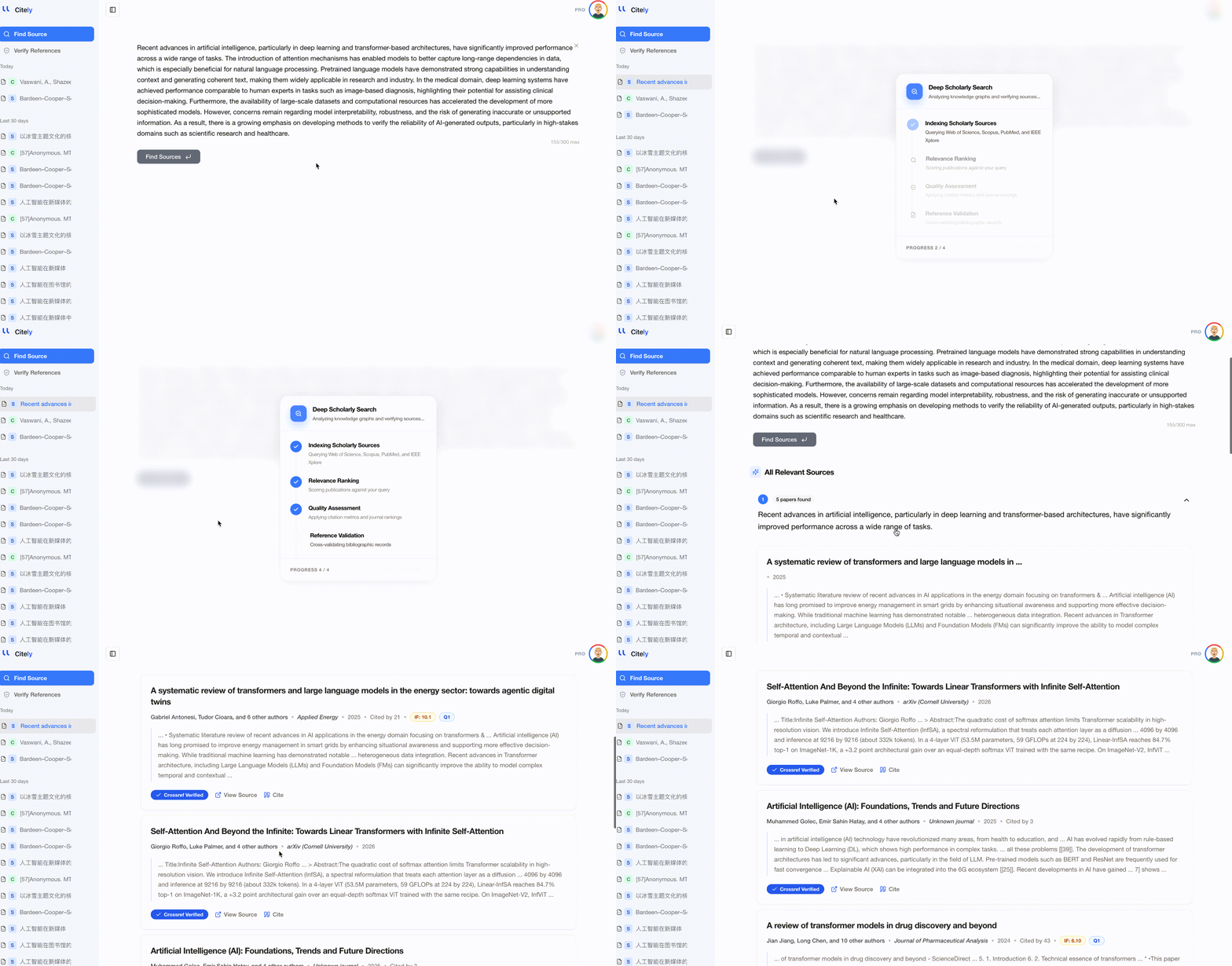
This is often faster than manual searching because the tool does not depend on you guessing the perfect keyword string. It searches academic databases for likely matches and returns candidate papers with metadata and links.
What Makes a Good Match?
When a source finder returns candidate papers, do not just pick the first title that looks related. Check:
- conceptual match: does the paper support the same claim?
- author credibility: is it a real academic source in the relevant field?
- publication type: article, review, conference paper, preprint
- date fit: is the source current enough for your use case?
The goal is not to find any paper. It is to find the paper that actually supports your paragraph.
Paragraph vs Sentence vs Quote: Different Search Strategies
| Input type | Best first step | Why |
|---|---|---|
| Full paragraph | Split into claims, then use an AI source finder | Too much text for manual keyword search |
| Single sentence | Search distinctive phrases in Scholar | Often enough to surface likely matches |
| Quote fragment | Exact phrase search in quotes | Best for verbatim or near-verbatim text |
| AI-generated claim | Source finder plus manual verification | The claim may be plausible but unsupported |
A Realistic Workflow for Students
If you are trying to find a citation behind a paragraph in an essay or literature review, use this workflow:
- Copy the sentence or paragraph
- Highlight the central claim
- Search one distinctive phrase in Google Scholar
- If results are weak, paste the paragraph into Source Finder
- Open 2-3 likely papers and compare abstracts
- Use the strongest source and verify the citation details before inserting it
This is much faster than manually reading dozens of papers from a broad topic search.
What to Do If No Exact Source Exists
Sometimes no single paper says exactly what your paragraph says. That can happen because:
- your paragraph combines findings from multiple papers
- the wording is too broad
- the claim is actually an unsupported AI-generated synthesis
In that case, do not force a fake exact citation. Instead:
- break the paragraph into smaller claims
- find one real paper for each claim
- rewrite the paragraph so it matches the actual evidence
How Citely Fits Into This Workflow
Citely is strongest when you start from incomplete information.
Use Source Finder when:
- you have text but no reference
- you want academic sources behind a claim
- you need likely papers fast
Then use Citation Checker when:
- you have selected a reference
- you want to confirm the title, authors, and date are correct
That two-step workflow matters because finding a likely source and verifying a finished citation are different tasks.
FAQ
Can I find a citation from a paragraph?
Yes. The most effective method is to identify the core claim and search by meaning, not just by exact wording.
How do I find a source from a sentence?
Use Google Scholar for distinctive phrases first. If the sentence is paraphrased or too broad, use an academic source finder.
What if the paragraph came from an AI draft?
Treat it carefully. AI can produce plausible claims that are not directly supported by any real paper. Find evidence first, then rewrite the paragraph around verified sources.
Is a source finder the same as a citation checker?
No. A source finder helps you locate papers from text. A citation checker verifies whether a finished reference is real and accurate.
Key Takeaways
- Citation finder from text is a real research workflow, not just another keyword variation
- The best method depends on whether you start with a paragraph, sentence, quote, or AI-generated claim
- Search by meaning is usually more effective than searching by title when the original source is missing
- If no exact source exists, rewrite the claim around verified evidence instead of inventing a citation
- Citely works best when Source Finder locates likely papers and Citation Checker verifies the final reference
Related Articles
Continue exploring topics you care about.
Citation Finder: How to Find a Published Reference for Any Claim (2026)
You have a claim in your draft but no source to back it up. This guide walks through 5 practical methods for finding the original published reference — from Google Scholar to AI-powered reverse search.
Read MoreDid ChatGPT Make Up This Citation? A 5-Minute Check for a Single Reference
You have one suspicious reference and no idea whether it's real. Here's a fast, reliable way to check if a citation exists before you put it in your paper.
Read MoreFree Citation Checkers in 2026: What You Get Before You Pay
Which free citation checkers actually verify that a paper exists, which only check formatting, and exactly where each free tier stops. Checked September 2026.
Read MoreThe Best Citation Checkers in 2026, Ranked by What They Actually Verify
Most citation checkers only check formatting. Compare what Citely, Scribbr, Recite, Zotero, Grammarly and Scite really verify in 2026, with current pricing.
Read MoreCitation Checker vs Citation Generator: What’s the Difference?
Citation generators create formatted references. Citation checkers verify whether references are real and accurate. Here is what each tool actually does and when to use them.
Read MoreCitation Verification 101: CrossRef, DOI, and How to Catch Fakes
CrossRef holds metadata for 150+ million scholarly works. Learn how DOIs work, how CrossRef verification catches fake citations, and how to use these systems to clean up any reference list.
Read More