
AI Source Finders vs Google Scholar: A Practical Comparison (2026)
Google Scholar has been the default research tool for 20 years. AI source finders are the new alternative. Here's an honest comparison: what each does better, where each falls short, and when to use which.
Google Scholar launched in 2004 and has been the default starting point for academic research ever since. It's free, it indexes nearly everything, and most researchers can navigate it in their sleep. So why are AI-powered source finders gaining traction in 2026? Not because Google Scholar is bad — it's still the most comprehensive academic search engine available — but because it wasn't designed for the way researchers actually work today. This article compares Google Scholar with AI source finders across the dimensions that matter most: input flexibility, result quality, verification, and workflow fit.
What Google Scholar Does Well
Credit where it's due. Google Scholar has real strengths that no competitor has fully matched:
Unmatched coverage
Google Scholar indexes content from virtually every academic publisher, preprint server, institutional repository, and academic website. It includes journal articles, conference papers, theses, books, court opinions, and patents. No other single tool covers this much ground.
Citation metrics
The "Cited by" count under each result is genuinely useful for gauging a paper's influence. The "Related articles" feature helps discover adjacent work. And the citation graph — who cites whom — enables the kind of backward and forward citation tracking that's essential for systematic reviews.
Zero learning curve
Everyone knows how to use Google Scholar. Type words, get results. No API keys, no account required, no setup. This matters more than researchers like to admit.
Where Google Scholar Falls Short in 2026
Keyword-dependent search
Google Scholar requires you to know the right search terms. If you're new to a field and don't know the jargon, you'll get irrelevant results or miss important papers that use different terminology.
Example: a researcher studying "fake academic citations" might not know to also search for "citation hallucination," "reference fabrication," "bibliographic fraud," and "AI-generated references." Each term returns different papers, and Google Scholar doesn't connect them for you.
No quality filtering
Google Scholar indexes everything — including predatory journals, retracted papers, low-quality preprints, and student theses. It makes no distinction between a paper in Nature and a paper in a pay-to-publish journal with no peer review. The responsibility to evaluate quality falls entirely on the researcher.
No verification
Google Scholar doesn't verify anything. It doesn't check if DOIs resolve. It doesn't flag retracted papers (it does occasionally, but inconsistently). It doesn't warn you if a paper you're looking at has been corrected or superseded. You find a paper, and you trust that it's real and current — often correctly, but not always.
Text-block input not supported
You can search for phrases in quotes, but you can't paste a paragraph and ask "find me the source of this." Google Scholar is a keyword search engine, not a semantic understanding tool.
What AI Source Finders Do Differently
AI-powered source finders like Citely approach the problem from the other direction. Instead of requiring precise keywords, they accept natural language — questions, topics, or blocks of text — and use language models combined with academic database queries to find relevant papers.
Natural language input
You can type "What are the environmental impacts of lithium mining for EV batteries?" and get relevant papers. You don't need to know that the academic term is "environmental externalities of lithium extraction." The AI bridges the vocabulary gap.
Text-to-source matching
Paste a paragraph from an essay, and the tool identifies the key claims and finds published papers that match. This is the use case Google Scholar simply can't handle.
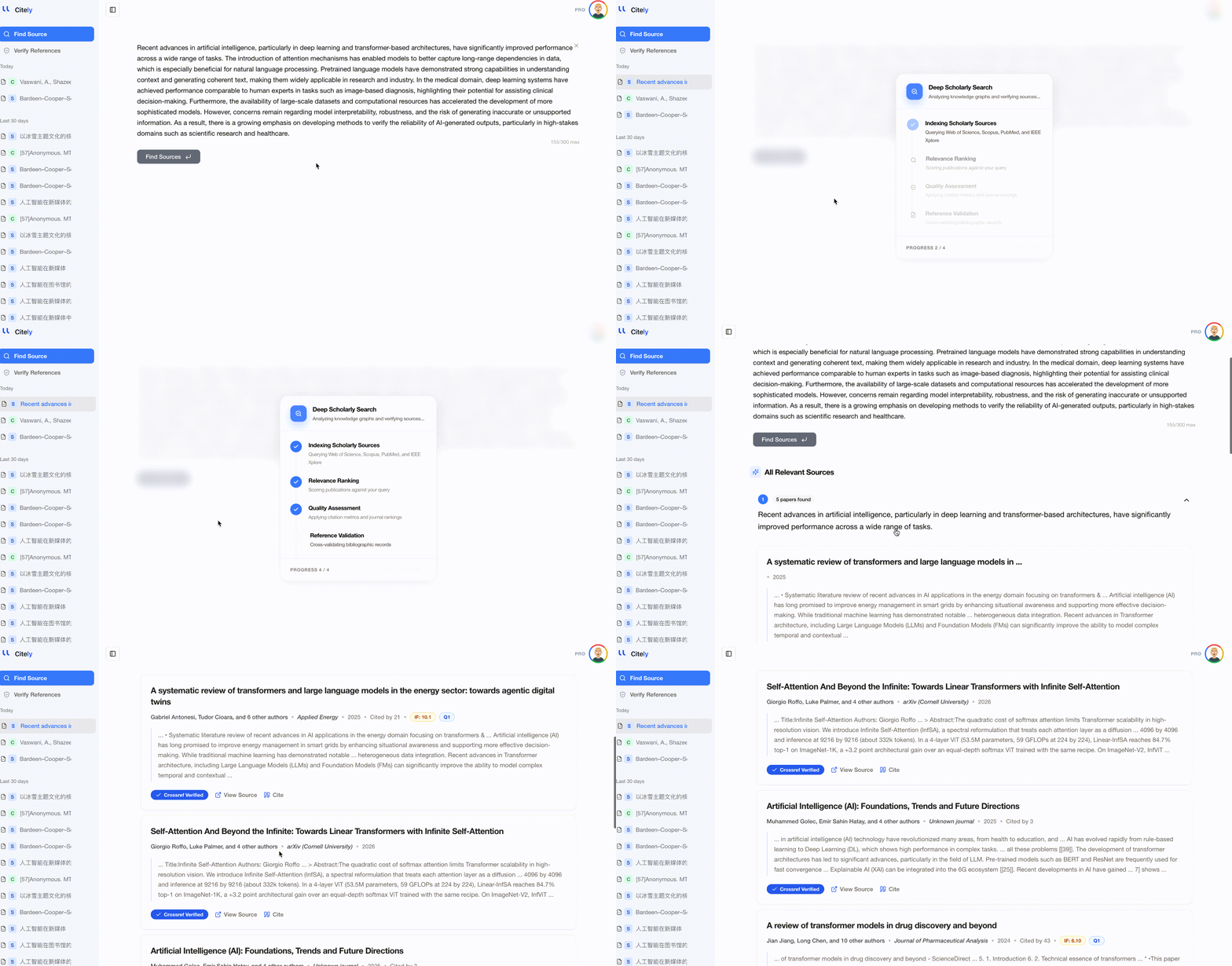
Built-in verification
This is the critical difference. AI source finders that are built on top of academic databases (like CrossRef) return results with verified DOIs. You know each result points to a real, published paper. Some tools, including Citely, pair the source finder with a Citation Checker so you can verify your entire reference list after building it.
Focused results
Instead of returning 50,000 results sorted by citation count, AI source finders typically return 5–20 highly relevant papers. This is both a strength (less noise) and a limitation (potentially missing important tangential work).
Head-to-Head Comparison
| Feature | Google Scholar | AI Source Finder (Citely) |
|---|---|---|
| Coverage (total indexed works) | Broadest (~400M) | Narrower (CrossRef 150M+) |
| Accepts natural language queries | No (keyword-based) | Yes |
| Accepts text blocks as input | No | Yes |
| Returns verified DOIs | Sometimes | Yes |
| Filters predatory/retracted papers | No | Partial |
| Citation metrics (cited by, h-index) | Yes | No |
| Forward/backward citation tracking | Yes | No |
| Number of results | Thousands | 5–20 focused |
| Free | Yes | Yes (free tier) |
| Learning curve | None | None |
When to Use Which
Use Google Scholar when:
- Exploring a new field — you need broad coverage to understand the landscape
- Looking for highly cited landmark papers — sort by citations, find the classics
- Doing citation tracking — "Cited by" and "Related articles" are unmatched
- Searching for non-journal content — theses, patents, technical reports, books
Use an AI source finder when:
- You have a paragraph and need matching sources — paste text, get papers
- You're new to a field and don't know the terminology — natural language queries bridge the jargon gap
- You need verified, DOI-confirmed papers — no predatory journal noise
- You're building a reference list from scratch — the focused results are easier to work with than 50,000 Google Scholar hits
- You want to verify sources at the same time — tools like Citely combine finding and verification
Use both when:
- Writing a thorough literature review — Google Scholar for breadth, AI source finder for precision
- Checking someone else's work — AI source finder to locate claimed sources, Google Scholar to find what they missed
A Realistic Workflow for 2026
The best approach isn't choosing one or the other — it's knowing when to reach for each:
- Start with an AI source finder for your specific research question → get 10–15 highly relevant, verified papers
- Expand with Google Scholar → search the same topic with keywords from the papers you found, catch anything the AI missed
- Do citation tracking in Google Scholar → follow "Cited by" chains from the most relevant papers
- Verify everything → run your complete reference list through Citely's Citation Checker before submission
Key Takeaways
- Google Scholar remains the broadest academic search engine with unmatched coverage and citation tracking — it's not going away
- AI source finders solve specific problems Google Scholar can't: natural language queries, text-to-source matching, and built-in verification
- Google Scholar's biggest weakness in 2026 is the lack of quality filtering — it indexes predatory journals and retracted papers without distinction
- AI source finders' biggest weakness is narrower coverage — they search CrossRef's 150M+ records, not Google Scholar's ~400M
- The best workflow uses both: AI source finder for precision and verification, Google Scholar for breadth and citation tracking
Related Articles
Continue exploring topics you care about.
Citely vs Google Scholar: They Solve Different Problems (Here's When to Use Each)
Google Scholar is a search engine for finding papers. Citely is a verification tool for checking if citations are real. They are complementary, not competing — here is when to use each.
Read MoreGoogle Scholar Alternatives When You Need More Than Search: Verification, Tracing, and Full-Text Access (2026)
Google Scholar finds papers but does not verify them. These alternatives fill different gaps — citation verification, source tracing, full-text access, and semantic search.
Read MoreSource Finder Tools Explained: How They Work and Which to Use (2026)
Source finder tools search academic databases to locate published papers matching your topic or text. Learn how they differ from Google Scholar, what databases they query, and which tool fits your research workflow.
Read MoreCitely vs Google Scholar: Find Academic Sources and Verify Citations
Compare Citely and Google Scholar for research workflows: when to use Google Scholar for discovery, when to use Citely to find academic sources from text and verify citation details before citing.
Read MoreGoogle Scholar vs Regular Google for Research: When to Use Each (2026 Guide)
For academic researchers navigating the vast digital landscape of information in 2026, understanding the fundamental differences between Google Scholar and regular Google is paramount for efficient and effective literature discovery. While both platforms offer
Read More"90% of Startups Fail": How to Find the Original Source of a Claim
Some statistics get repeated everywhere and cited nowhere. Here's how to trace a widely quoted claim back to the study it came from — and what to do when the trail runs out.
Read More