
Citation Verification 101: CrossRef, DOI, and How to Catch Fakes
CrossRef holds metadata for 150+ million scholarly works. Learn how DOIs work, how CrossRef verification catches fake citations, and how to use these systems to clean up any reference list.
Citation verification is the process of confirming that a reference in your bibliography points to a real, published scholarly work with correct metadata. It relies on two systems that most researchers use daily without fully understanding: DOIs and CrossRef. If you've ever clicked a DOI link in a paper and landed on the publisher's website, you've used both. This guide explains how these systems work, why they matter for catching fabricated citations, and how to use them — manually or with automated tools — to verify any reference list.
What Is a DOI, Really?
A DOI (Digital Object Identifier) is a permanent identifier assigned to a published work. Think of it as a social security number for a paper. Once assigned, a DOI never changes, even if the publisher moves the paper to a new URL.
A DOI looks like this: 10.1038/nature12373
The structure tells you something:
- 10 — the DOI directory indicator (always 10)
- 1038 — the registrant code (this one belongs to Nature Publishing Group)
- /nature12373 — the suffix, assigned by the publisher
When you resolve a DOI (by going to https://doi.org/10.1038/nature12373), the DOI system looks up where that paper currently lives and redirects you there.
Why DOIs matter for verification
Because DOIs are registered with metadata — author names, title, journal, year, volume, pages — you can check any citation against its DOI record to see if the details match. This is the foundation of citation verification.
If a DOI doesn't exist in the registry, the citation is either fabricated or contains a typo. If it exists but the metadata doesn't match what's in the citation, you have a chimera reference — a citation assembled from parts of different papers.
What Is CrossRef?
CrossRef is a non-profit registration agency that maintains the largest database of DOI metadata in the world. As of 2026, CrossRef holds metadata for over 150 million scholarly works from more than 20,000 publishers.
When a publisher registers a new paper with CrossRef, they submit:
- The DOI
- Title
- Author names
- Journal name
- Volume, issue, and page numbers
- Publication date
- References cited by the paper (for participating publishers)
CrossRef makes this metadata queryable through a public API. Anyone can look up a DOI and get back the official record. This is what powers most citation verification tools — including Citely.
CrossRef is not the only registration agency
There are several DOI registration agencies:
- CrossRef — journal articles, conference papers, books (the largest)
- DataCite — datasets, software, and other research outputs
- mEDRA — primarily European publishers
- ISTIC — Chinese scholarly publications
Most citation checkers query CrossRef first because it covers the vast majority of journal articles. But a DOI starting with a DataCite registrant code (common for datasets) won't be found in CrossRef's database — this doesn't mean the citation is fake.
How Citation Verification Works Step by Step
Here's the full process, whether you're doing it manually or understanding what an automated tool does:
Step 1: Extract the DOI
If the reference includes a DOI, extract it. Common formats:
https://doi.org/10.1038/nature12373doi: 10.1038/nature12373DOI 10.1038/nature12373
If no DOI is listed, you'll need to search by title and author (Step 1b).
Step 1b: Search by title
When no DOI is available, search the exact paper title in:
- CrossRef's search
- Google Scholar (in quotes)
- PubMed (for biomedical papers)
If the title returns zero results across all three, the paper very likely doesn't exist.
Step 2: Resolve the DOI
Go to https://doi.org/[your-DOI]. Three outcomes:
- Resolves to the paper → The DOI is valid. Proceed to Step 3.
- "DOI not found" error → The DOI doesn't exist. The citation is fabricated or contains a typo.
- Resolves to a different paper → The DOI belongs to a different publication. This is a chimera reference.
Step 3: Compare metadata
This is where most manual verification falls short — people stop at Step 2 and assume a resolving DOI means the citation is correct. You need to compare:
| Field | Your citation says | CrossRef record says | Match? |
|---|---|---|---|
| Authors | Smith, J. & Lee, K. | Smith, J. & Lee, K. | Yes |
| Year | 2024 | 2023 | No |
| Title | "Deep learning for..." | "Deep learning for..." | Yes |
| Journal | Nature Methods | Nature Methods | Yes |
| Volume | 21 | 20 | No |
In this example, the DOI resolves and the paper is real, but the year and volume are wrong. This is a common pattern in AI-generated references — the model finds a real paper but garbles the details.
Step 4: Check for retraction or correction
Even if everything matches, check whether the paper has been retracted or corrected:
- Search on Retraction Watch
- Check the CrossRef metadata for a "retraction" or "correction" type entry
- Look for notices on the publisher's website
Manual vs. Automated Verification
Manual verification
Pros: You see everything, can catch context-level issues, and develop research literacy. Cons: Takes 2–3 minutes per reference. For a 40-reference paper, that's 80–120 minutes.
Automated verification with Citely
Citely's Citation Checker runs Steps 1–3 automatically for every reference in your list. Paste your references, and it queries CrossRef's database, resolves DOIs, compares metadata fields, and flags discrepancies.
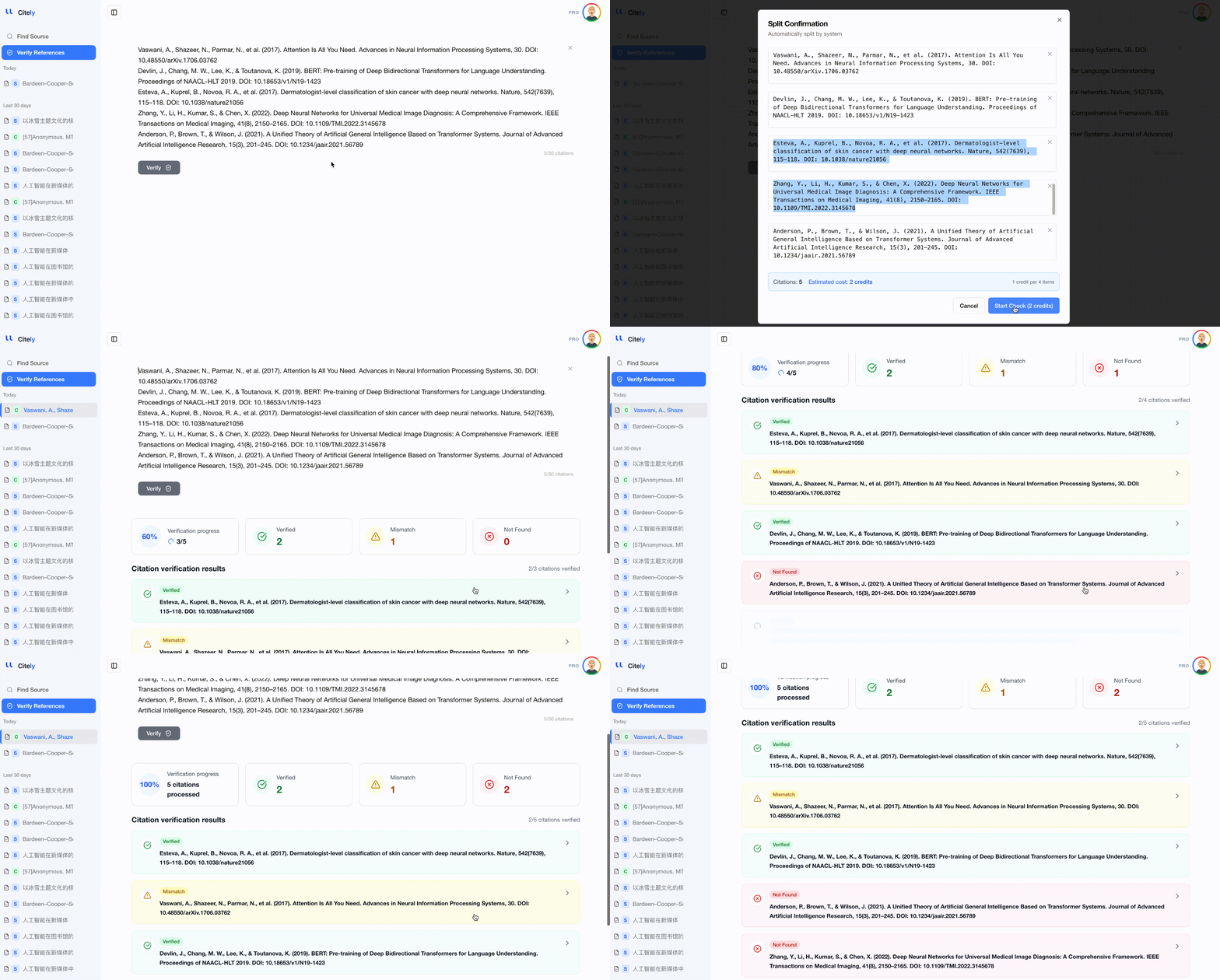
Pros: Checks an entire reference list in seconds. Catches metadata mismatches that manual spot-checking would miss. Cons: Doesn't check retraction status (yet) or evaluate whether you've cited sources appropriately in context.
The practical recommendation: use Citely for the bulk verification pass, then manually review any references it flags, plus any references to sources not indexed in CrossRef (books, government reports, websites).
Common Verification Scenarios
"The DOI works but the title is slightly different"
This usually means the citation is real but the title was paraphrased or truncated. Check the rest of the metadata — if author, year, and journal match, it's likely just a formatting issue. Fix the title to match the official record.
"No DOI found and the title returns zero results"
Strong signal of a fabricated reference. Before concluding it's fake, try searching for the first author's name plus a few keywords from the title. If that also returns nothing, the reference should be removed and replaced.
"The DOI resolves to a completely different paper"
This is the chimera pattern. The DOI belongs to a real paper, but it's not the paper described in your reference. The citation needs to be replaced entirely — either find the correct DOI for the paper you intended to cite, or find the correct citation for the DOI you've listed.
"CrossRef shows the paper but with different authors"
Common in AI-generated references where the model substitutes author names. Correct the authors to match the CrossRef record.
Key Takeaways
- DOIs are permanent identifiers for scholarly works, registered with metadata that enables verification against the official record
- CrossRef maintains 150+ million DOI records and is the primary database used by citation verification tools
- Full verification requires four steps: extract DOI, resolve it, compare metadata field by field, and check for retraction
- A resolving DOI alone doesn't mean a citation is correct — you must cross-check the metadata (authors, year, title, journal)
- Automated tools like Citely handle Steps 1–3 for entire reference lists in seconds, but manual review is still needed for retraction checks and non-DOI sources
Related Articles
Continue exploring topics you care about.
Citation Verification Should Come Before Reference Management
Reference management helps you organize sources, but it does not tell you whether those sources are real, accurate, or traceable. In AI-assisted research workflows, that distinction matters more than
Read MoreGoogle Scholar Alternatives When You Need More Than Search: Verification, Tracing, and Full-Text Access (2026)
Google Scholar finds papers but does not verify them. These alternatives fill different gaps — citation verification, source tracing, full-text access, and semantic search.
Read MoreHow to Check if an AI-Generated Citation Is Real (2026 Guide)
A step-by-step guide to verifying AI-generated citations in 2026. Learn how to detect fake references, check DOIs, and use automated tools like Citely to cross-reference 200M+ academic records in seconds.
Read MoreFree Citation Checkers in 2026: What You Get Before You Pay
Which free citation checkers actually verify that a paper exists, which only check formatting, and exactly where each free tier stops. Checked September 2026.
Read MoreDid ChatGPT Make Up This Citation? A 5-Minute Check for a Single Reference
You have one suspicious reference and no idea whether it's real. Here's a fast, reliable way to check if a citation exists before you put it in your paper.
Read MoreChecking References in APA, MLA, and Chicago: Formatting Is Not Verification
A perfectly formatted reference can still point to a paper that doesn't exist. Here's what each citation style shows, what it hides, and how to check that your references are actually real.
Read More