
Semantic Scholar and Google Scholar are both free, both keyword-driven, and both a risky place to stop when you need a citation by tonight. Semantic Scholar, run by the non-profit Ai2, says it indexes over 200 million papers and adds machine-written TLDR summaries and a free API. Google Scholar publishes no size, but a 2019 study in Scientometrics estimated 389 million records, the largest of the 12 systems it tested. Neither is complete: in a 2024 test against 116,000 randomly sampled Crossref records, Google Scholar lacked 9.8% and Semantic Scholar 10%. So the useful question is not which index is bigger. It is which one gets you from a sentence in your draft to a specific, correctly described paper, and what you still have to verify by hand once you have a hit. This comparison is current to October 2026 and uses only sources we checked this month.
Why "which is bigger?" is the wrong question
Most comparisons stop at index size and a feature list. That is useful if you are doing a literature search. It is not much help if you have already written the sentence and need the paper behind it: "Sleep deprivation impairs memory consolidation" or "remote work raised productivity in call centres." You are not exploring a topic; you are matching a claim to one source that supports it, then writing down its authors, year and title without mistakes.
That task has three failure points. The paper may not be in the index. It may be in the index with wrong metadata. Or you may find a real paper that does not say what your sentence says. Index size only affects the first one, so it is worth looking at what each tool actually does before deciding which to open first.
What each tool is built for
Semantic Scholar
Semantic Scholar launched in 2015 as a project at Ai2 and says it builds its index from publisher partnerships, data providers and web crawls. The Semantic Scholar Open Data Platform paper describes an academic graph of 200M+ papers and 2.4B+ citation edges, and the API page currently lists about 214 million papers.
Two things set it apart from Google Scholar. First, its TLDR feature produces one-sentence machine-generated summaries; the page describes it as a beta covering nearly 60 million papers in computer science, biology and medicine. The underlying research is public: Cachola et al. (2020) built the SciTLDR dataset of 5.4K summaries over 3.2K papers. Second, it has a documented, free API with Academic Graph, Recommendations and Datasets services. The API page says most endpoints need no login, though a key is recommended and brings higher limits.
The catch for claim-matching: a TLDR tells you what a paper is about, not whether it supports your sentence. It is also machine-written, so it is a triage aid, never something to cite or paraphrase from.
Google Scholar
Google Scholar searches articles, theses, books, abstracts and court opinions from publishers, repositories, universities and other websites. It ranks using a result's full text, venue, authors and how often and how recently it has been cited. Its help page adds preprints, technical reports and patents, and points you to "All versions," "Related articles," "Cited by" and library links for finding full text.
Two limits matter. The help page says Scholar cannot provide bulk access and does not mention an API, so anything automated is on you. And while the Cite button exports BibTeX, EndNote, RefMan and RefWorks, the help page also warns that corrections to its index can take six to nine months or longer. A wrong year you spot today may still be wrong next semester.
Coverage: bigger does not mean complete
On raw size, Google Scholar leads. Gusenbauer (2019) put it at 389 million records and called it the most comprehensive academic search engine of the 12 tested, noting that earlier work may have underestimated it by more than half. That 389 million is a researcher's estimate, not a Google figure, and Semantic Scholar's 200M+ is the vendor's own count. Do not treat the two numbers as measured on the same scale.
On citations, Google Scholar also wins. Martín-Martín et al. (2021) compared six sources and found that Google Scholar surfaced 88% of all citations, including almost all of what the other sources found. That matters for the "Cited by" chaining that most of us use to track down who said something first.
But completeness against a fixed list tells a humbler story. Delgado-Quirós et al. (2024) sampled 116,000 Crossref records and checked what seven free databases held. Lens and Scilit missed 0.1% and 0.2%; Google Scholar missed 9.8% and Semantic Scholar 10%. The authors attribute most gaps to how each service builds its database, including web accessibility and robot-exclusion rules. Practically, roughly one real DOI-bearing paper in ten may not turn up in either engine, which means a "no results" screen is weak evidence that a paper does not exist.
One more result is worth knowing if your claim comes from a review project. Gusenbauer and Haddaway (2020) tested 28 search systems and judged Google Scholar inappropriate as the principal search system for evidence syntheses. It is excellent for finding a known paper and poor for reproducible, documented searching.
Metadata: the part nobody tests
Most "versus" articles never check whether the record you find is correct, and that is where citations go wrong. Zeitlyn and Beardmore-Herd (2018), in First Monday, tested Google Scholar's bibliographic exports and reported them reliable for journal articles and conference proceedings, while books and edited collections were often described incorrectly or incompletely, with a particular problem for items from online repositories.
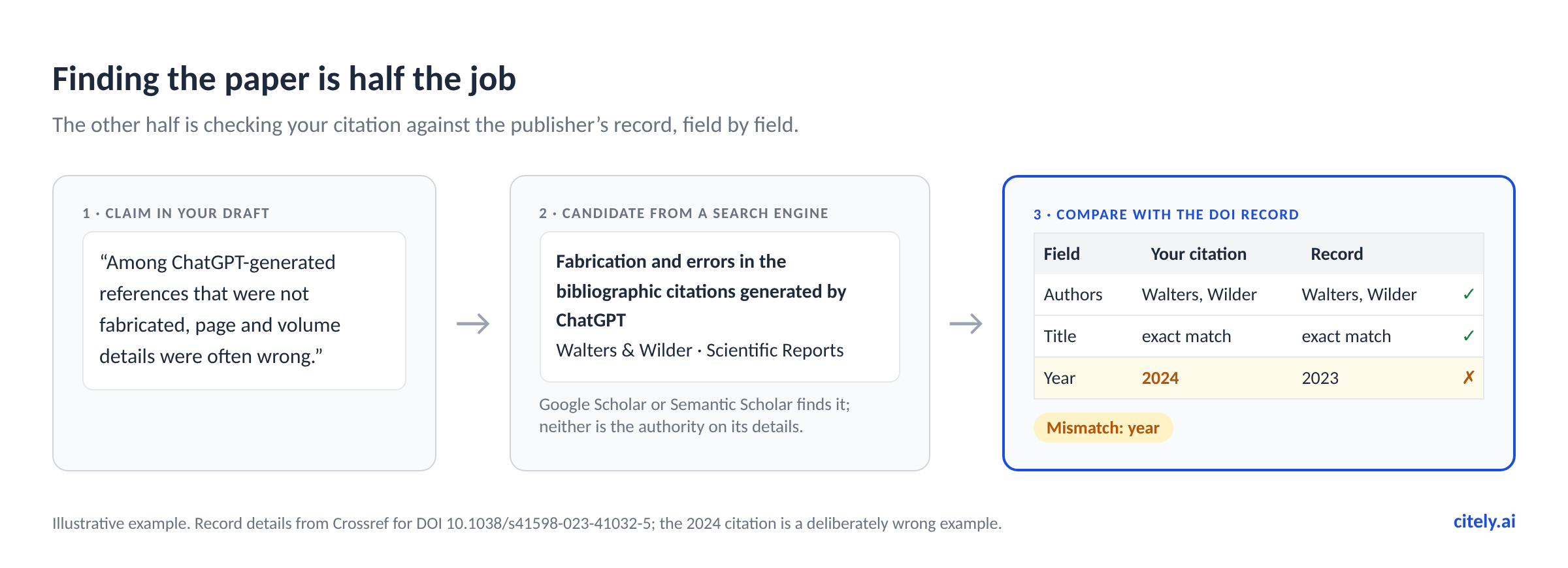
We could not find an equivalent peer-reviewed accuracy study for Semantic Scholar's metadata, so we will not claim it is better or worse. The safe reading is narrower: neither engine is an authority on a paper's authors, year or title. The publisher page and the DOI record are.
Google Scholar vs Semantic Scholar at a glance
As of October 2026. Both are free to search; prices may change; we re-check monthly.
| Google Scholar | Semantic Scholar | |
|---|---|---|
| Index size | No official figure; 389M estimated in a 2019 study | "Over 200 million" (About page); about 214M (API page) |
| Run by | Ai2 (non-profit) | |
| Independent coverage test (116k Crossref records, 2024) | 9.8% missing | 10% missing |
| Content types | Articles, theses, books, preprints, reports, court opinions, patents | Academic papers |
| Summaries | None | TLDRs in beta, nearly 60M papers in CS, biology, medicine |
| API | None documented; no bulk access | Free; key recommended |
| Export from the interface | BibTeX, EndNote, RefMan, RefWorks | Not checked for this comparison |
| Speed of corrections | Can take 6–9 months or longer | Not stated |
A workflow for tracing one claim to a paper
For a single sentence, this takes about ten minutes and uses both tools for what each does best.
- Search Google Scholar with a distinctive phrase. Use two or three specific nouns from the claim, not the whole sentence, and put any title fragments in quotes. Scholar's own help suggests quoted titles as a way to test whether it covers a source.
- Check the top hits in Semantic Scholar. If the paper appears, read the abstract and the TLDR (if it has one) to judge relevance quickly. If it does not, try again before concluding anything; remember the roughly one-in-ten gap.
- Follow "Cited by" from the best candidate. The earliest, most-cited paper in a chain is often the original source rather than a review that repeats it.
- Open the DOI or publisher page. Copy authors, year and title from there, not from a search result.
- Read the relevant passage. Confirm the paper actually supports your sentence, not just the topic.
Steps one to three are search. Step four is verification, and step five is reading. Search engines only help with the first.
How Citely fits
Citely is built for the sentence-to-source step. Paste a claim into Source Finder and it searches academic databases such as OpenAlex, Crossref, Google Scholar and Wanfang (for Chinese papers), then returns candidate papers with verified metadata. It handles one claim at a time, up to 300 words per search, so split longer text into separate searches. If you are working through a draft sentence by sentence, Find Sources for Essay walks through that flow, and Source Finder From Text is the page for turning a paragraph into candidate references.
Billing favours the careful: each search costs 1 credit, and no credit is charged when no papers are found. New accounts get 3 free credits, so you can try it on a real claim before paying anything.
Once you have references, the other half of the loop is Citation Checker, which marks each reference Verified, Mismatch or Not Found. Mismatch means the title matches a real paper but the authors or year do not, which is exactly the error a search-result copy-paste produces.
When you should stay with Google Scholar or Semantic Scholar
Free tools are the right answer more often than a product page will admit.
You are exploring a topic, not sourcing a claim. For browsing a field, following citation trails and setting up alerts, Google Scholar and Semantic Scholar are better places to wander than a tool that expects a sentence.
You need legal opinions, theses, books or patents. Scholar's coverage of those formats is a feature you will not get from a paper-focused index.
You need an API or an author profile. Semantic Scholar's free API is the more practical choice for building anything; Scholar remains the usual home for public author profiles and citation tracking.
You already have the paper's title. Paste it into Google Scholar in quotes, open the DOI, and compare the record. That takes two minutes, and it is the same check you would want anyway.
You are doing a systematic review. Neither tool alone meets the documented, reproducible searching that Gusenbauer and Haddaway describe; use the databases your protocol names.
Key Takeaways
- Google Scholar is estimated to be larger (389M records in a 2019 study) and finds more citations (88% of all citations in a 2021 six-source comparison), but Google publishes no official size.
- In a 2024 sample of 116,000 Crossref records, Google Scholar lacked 9.8% and Semantic Scholar 10%, so a missing result is not proof a paper does not exist.
- Semantic Scholar adds a free API and machine-written TLDRs for nearly 60M papers in CS, biology and medicine; a TLDR helps with triage but is not a source to cite.
- Neither engine is an authority on authors, year or title, and Google Scholar's help page says index corrections can take months. Copy metadata from the DOI or publisher page.
- Use search engines to find candidates, then verify the record and read the passage before you cite.